

Introduction
In this article, I am going to explain about "Remote Validation", using MVC 5. Remote Validation is mainly used to check if the user or Mail ID exists or not in a database. Also, you can use it for any type of validation using Remote Attribute.
Most of the Web Applications need to validate the user or mail ID in the database. For this, the developers need to write huge amount of code. Due to this, I am going to achieve this task in very simple steps. Remote Validation normally works as jQuery validation.

Before learning about "Remote Validation", if you are beginner in MVC, you should read these -
- Learn Model view controller.
- Error validation in MVC
- Learn about Razor.
- what is fluent validation.
- MVC application architecture.
What is Remote Validation?
Remote Validation permits the developer to call the controller action, using client side script. This is valuable when you need to perform out a back end query without performing a full Server side Postback.
Implement of "Remote Validation" in MVC Application.
Remote Validation is only an AJAX call, which approves the client's information. This can undoubtedly be proficient without using ASP.NET MVC 5. The situation for our demo is very basic. We have to ensure that the EmpName of the new user is one of a kind. The execution beneath makes a basic structure, which contains the TextBox control with the Id EmpName and other TextBox control with Id EmpMail.
Follow some simple steps to use remote validation in MVC 5
Step 1 - Create a MVC Application. See the image, given below-
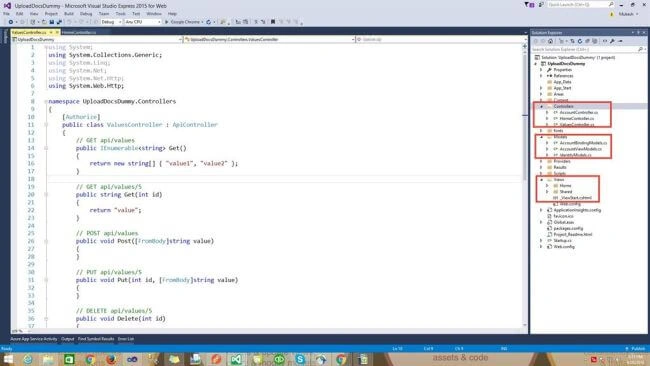
Step 2 - Create a model "Employee.cs" inside "Model" folder. Use the code, given below-
- using System;
- using System.Collections.Generic;
- using System.Linq;
- using System.Web;
- using System.Web.Mvc;
- namespace RemoteValidation.Models {
- public class Employee {
- //To Check userName
- [Remote("IsEmpNameExist", "Validation", ErrorMessage = "Employee name already exist")]
- public string EmpName {
- get;
- set;
- }
- //check User name and mailId.
- [Remote("IsEmpNameandMailExist", "Validation", ErrorMessage = "EmialId is already exist", AdditionalFields = "EmpName")]
- public string EmpMail {
- get;
- set;
- }
- }
- //Set static value in model.
- public static class EmployeeStaticData {
- public static List < Employee > UserList {
- get {
- return new List < Employee > {
- new Employee {
- EmpName = "Bikesh", EmpMail = "[email protected]"
- },
- new Employee {
- EmpName = "Navdeep", EmpMail = "[email protected]"
- }
- };
- }
- }
- }
- }
- using RemoteValidation.Models;
- using System;
- using System.Collections.Generic;
- using System.Linq;
- using System.Web;
- using System.Web.Mvc;
- namespace RemoteValidation.Controllers {
- public class ValidationController: Controller {
- //For check both at a time .mailid and empName.
- [HttpGet]
- public JsonResult IsEmpNameandMailExist(string Empname, string EmpMail) {
- bool isExist = EmployeeStaticData.UserList.Where(u => u.EmpName.ToLowerInvariant().Equals(Empname.ToLower()) && u.EmpMail.ToLowerInvariant().Equals(EmpMail.ToLower())).FirstOrDefault() != null;
- return Json(!isExist, JsonRequestBehavior.AllowGet);
- }
- //To check only EmpName
- [HttpGet]
- public JsonResult IsEmpNameExist(string Empname) {
- bool isExist = EmployeeStaticData.UserList.Where(u => u.EmpName.ToLowerInvariant().Equals(Empname.ToLower())) != null;
- return Json(!isExist, JsonRequestBehavior.AllowGet);
- }
- }
- }
- using System;
- using System.Collections.Generic;
- using System.Linq;
- using System.Web;
- using System.Web.Mvc;
- using RemoteValidation.Models;
- namespace RemoteValidation.Controllers {
- public class EmployeeController: Controller {
- //my action
- [HttpGet]
- public ActionResult AddUser() {
- Employee model = new Employee();
- return View(model);
- }
- }
- }
- @model RemoteValidation.Models.Employee
- <
- div class = "panel panel-primary" >
- <
- div class = "panel-heading panel-head" > Add User < /div> <
- div class = "panel-body" >
- @using(Html.BeginForm()) { <
- div class = "form-horizontal" >
- <
- div class = "form-group" >
- @Html.LabelFor(model => model.EmpName, new {
- @class = "col-lg-2 control-label"
- }) <
- div class = "col-lg-9" >
- @Html.TextBoxFor(model => model.EmpName, new {
- @class = "form-control"
- })
- @Html.ValidationMessageFor(model => model.EmpName) <
- /div> </div >
- <
- div class = "form-group" >
- @Html.LabelFor(model => model.EmpMail, new {
- @class = "col-lg-2 control-label"
- }) <
- div class = "col-lg-9" >
- @Html.TextBoxFor(model => model.EmpMail, new {
- @class = "form-control"
- })
- @Html.ValidationMessageFor(model => model.EmpMail) <
- /div> <
- /div> <
- div class = "form-group" >
- <
- div class = "col-lg-9" > < /div> <div class="col-lg-3"> <
- button class = "btn btn-success"
- id = "btnSubmit"
- type = "submit" >
- Submit <
- /button> <
- /div> <
- /div> <
- /div>
- <
- /div> <
- /div>
- @section scripts
- {
- @Scripts.Render("~/bundles/jqueryval")
- }
- <appSettings>
- <add key="ClientValidationEnabled" value="true" />
- <add key="UnobtrusiveJavaScriptEnabled" value="true" />
- </appSettings>
- using System.Web;
- using System.Web.Optimization;
- namespace RemoteValidation {
- public class BundleConfig {
- // For more information on bundling, visit http://go.microsoft.com/fwlink/?LinkId=301862
- public static void RegisterBundles(BundleCollection bundles) {
- bundles.Add(new StyleBundle("~/Content/css").Include(
- "~/Content/css/bootstrap.css",
- "~/Content/css/font-awesome.css",
- "~/Content/css/site.css"));
- bundles.Add(new ScriptBundle("~/bundles/jquery").Include(
- "~/Scripts/jquery-{version}.js"));
- bundles.Add(new ScriptBundle("~/bundles/jqueryval").Include(
- "~/Scripts/jquery.validate*"));
- }
- }
- }
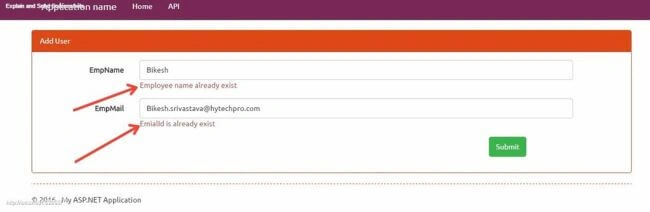
According to this image, you can see that I am typing "Bikesh". It is showing an error message "Employee name already exists" because I have written the hard-coded "Bikesh" in the model.
There are two situations to check Validation.
- You can check only Employee Name.
- You can check both conditions, "Employee Name" and Email Id.
I hope, you understood all the things about "Remote validation". You can also download the project and run it on your system.
Thabo HappyPosted Sep 26, 2018, 7:36 PM
I followed all the steps and i think it works but when i press/click register nothing happens doesn't submit the form which is good but it doesn't view the error message, any help please
Vishal DongaPosted Jul 1, 2018, 11:49 PM
I am unable to use JsonRequestBehavior parameter. How can I use it?
Sandeep PawarPosted Aug 17, 2017, 2:41 AM
I have integrated the above demo in my MVC application and it is working fine but now I want to send the hidden field value in parameter(i.e in Additional fields) but unable to achieve it, could you please suggest any solution for this?
Manav PandyaPosted Oct 2, 2016, 1:57 AM
Nice sir ...
Humayun Kabir MamunPosted Oct 1, 2016, 11:45 PM
Nice...